Occasionally you may be approached by a participant that claims that they are missing votes on their entry, or that their entry total should be higher than what it is.
|
If a participants claims that there are votes missing on their entry, it's helpful to know the following:
|
Using that information, you can confirm who has voted on an entry and check vote totals following the instructions below:
- Checking for votes as a Contest Admin
- Checking for votes as a Contest Participant
- What if I can't find the missing votes?
Checking for votes as a Contest Admin:
1. Log into the GGPC Admin: www.gogophotocontest.com/admin
2. Click on Entries at the top of the GGPC Admin:
3. The Contest Entries- Approved page loads.
Search for the participant by name in the drop down at the top of the page
(or you can use CTRL + F):
Once located, click the Votes button :
4. The Entry Information page loads.
This page contains a list of all of the votes that have been applied toward an entry. (There is also an option to transfer or credit votes on this page, which you can learn more about at this link: Transferring Votes or Crediting Votes to a Vote Bank).
5. Check to see if you can find the missing voter information. If located, let the participant know that the votes have been accounted for.
It might be helpful to provide them with the date and time stamp that they were applied (under the Date Applied column), so that they know that they were registered in our system.
6. If it's the vote total that is in question, tally up the votes in the Votes column. The vote total is also supplied under the entry photo:
Checking for votes as a Contest Participant:
The second method involves the participant directly.
You can instruct the participant to sign into their account at your contest website:
Under their My Entries dashboard, they can double-check the names of the voters (and number of votes) applied to their entry.
We also have participant-friendly instructions at the following link that you can share directly with your participant:
Here's an example of what they see on their My Entries dashboard:
What if I can't find the missing votes?
Double-check to ensure that the voter in question actually made a vote donation.
1. Do this by clicking Transactions at the top of the GGPC Admin:
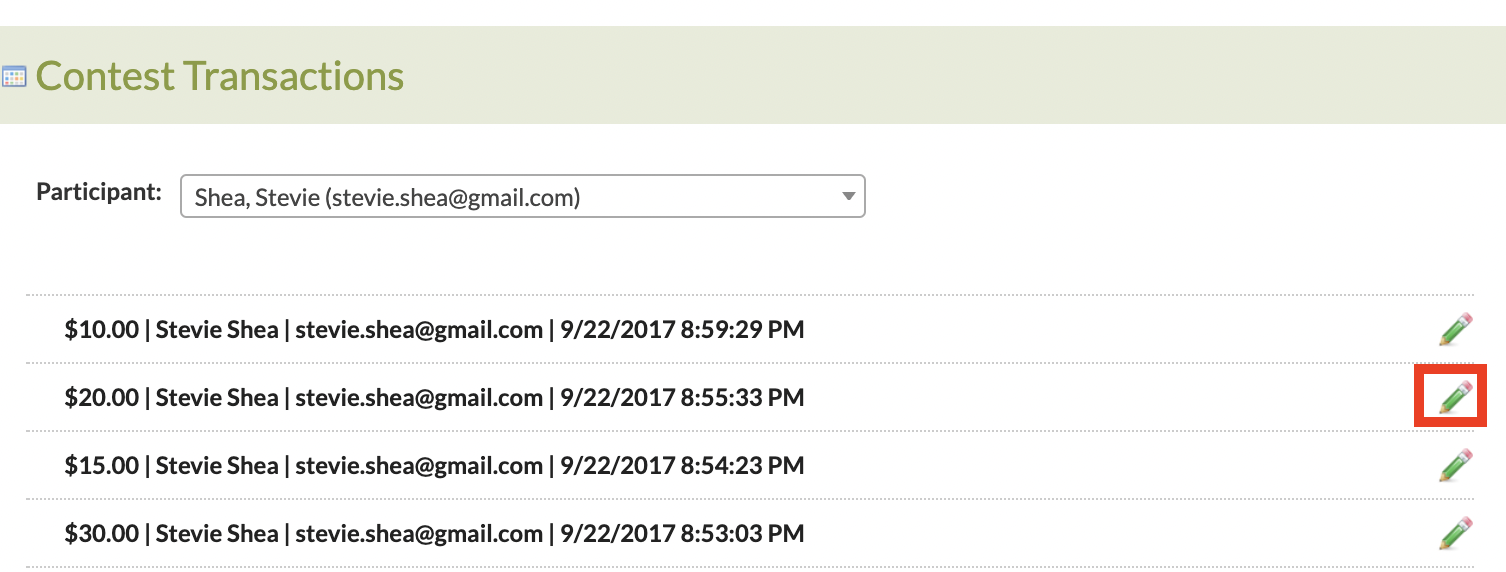
2. The Contest Transactions page loads. Using the drop down at the top of the page, search for the name of the participant to see if you can locate a vote donation from them.
If you find their name, click the Pencil Icon next to their name to see how it's been recorded:
3. The View Transaction page loads. Check to see what type of donation they made under "Donation Type":
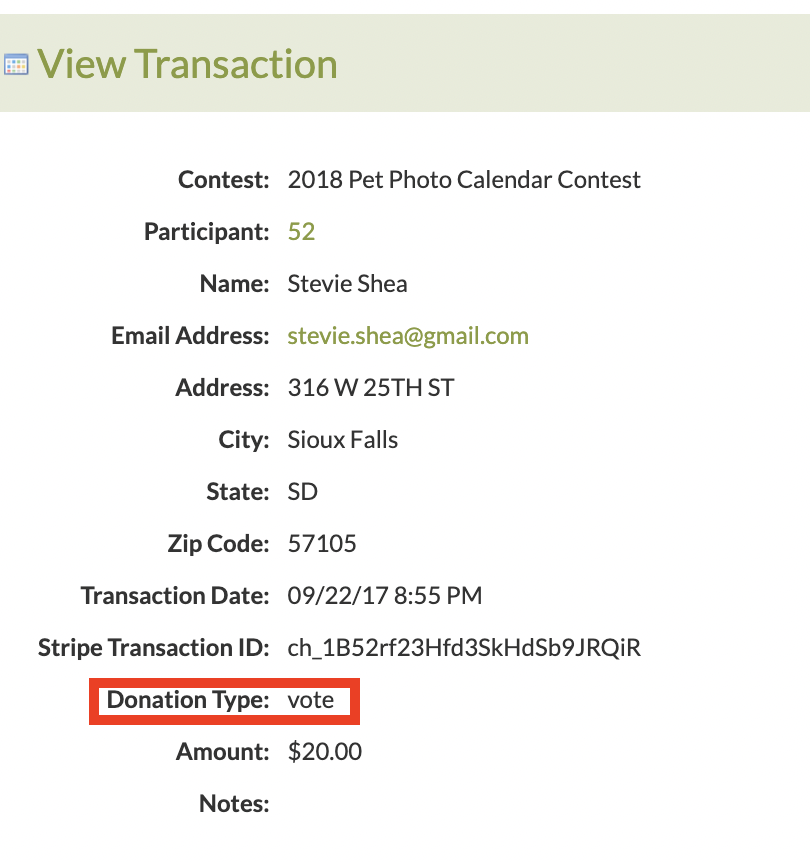
4. If you're still unable to find a transaction for the voter in question: Then there is a high probability that they didn't actually vote.
All vote donations that pass through our system are tied to a recorded financial transaction, which means every vote is tied to a transaction.
|