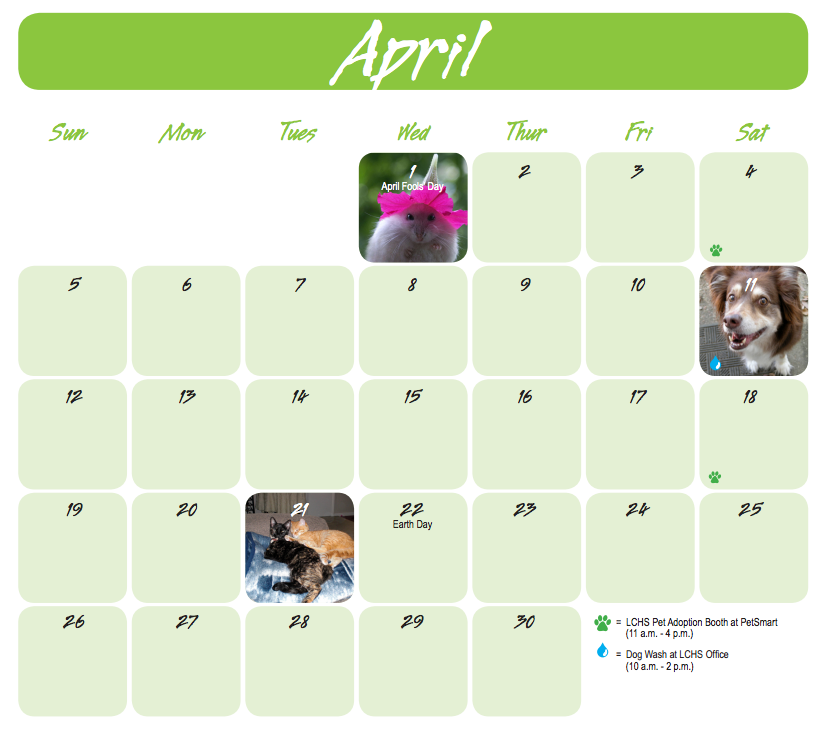
Many calendar design templates allow customization of individual calendar dates or grid spaces with a photo (and sometimes even a caption).
The Reserve-A-Spot Module is available to any organization that is offering a photo calendar as part of their prize package, and is working with a print shop that allows customization of individual calendar dates or empty grid spaces.
- Why should I offer reserved spots?
- How does it work?
- Is this module right for my photo contest?
- How much does it cost to use this module?
- I want to use this module- how do I advertise it on my photo contest site?
Why should I offer Reserved Spots?
Two simple reasons:
#1 Increased calendar sales
Supporters love the opportunity to honor their pet by reserving a meaningful date, such as their pet’s birthday, adoption day, or even their own birthday. This allows more pets to be featured in the calendar and typically leads to higher calendar sales, since most participants who reserve a spot also plan to purchase a copy.
#2 An easy fundraising boost
Each reserved spot requires a donation, creating an additional revenue stream for your campaign. It can also help you reach the $5,000 (5%) pricing threshold more quickly.
|
How does it work?
First, you choose whether you want participants to reserve calendar dates (most popular) or grid spaces (the blank spaces before and after calendar dates each month). It has to be one or the other- it can't be both.
Then, you specify the donation amount required per calendar date or grid space (most organizations require a $10-$15 donation).
If you'd like to place a limit on the number of available reserved dates or grid spaces each month, let us know and we can set that up for you too.
We take this information and create a Reserve-A-Spot form that look similar to this (below is a example of the calendar date option):
Dates that have already been reserved are automatically greyed out and are unable to be chosen twice:
This is how it looks for the grid space option (instead of dates):
This form is available under the Participate drop-down on your contest site:
It's also located in the right-hand container on your Home page, under Recent Entries:
Share the link to the form on your website and social media (Facebook, Twitter, etc). The form can remain live even after your contest has ended, for continued Reserve-A-Spot sales.
Access to the information for those who have reserved a spot in the GGPC Admin under Reports & Downloads > Reserve a Spot (private details have been blurred for this example- click to enlarge):
You can also download the images uploaded to the Reserve-A-Spot Module on this page, by clicking Download Calendar Spot Images at the top of the page.
Is this module right for my photo contest?
GoGo Photo Contest does not offer calendar design services, and so you would need to work with a print house or studio that allows individual calendar dates or grid spaces to be customized.
We recommend working with our friends at GBC Fundraising Calendars- they offer customized dates among a plethora of other calendar options.
Learn more about GBC Fundraising Calendars➛
How much does it cost to use this module?
It does not cost extra to use the Reserve-A-Spot Module, but the donations that come in through the module are subject to our regular GoGo Photo Contest transaction fees.
Read more about it here➛
I want to use this module— how do I advertise it on my photo contest site?
We'll place a blurb on your Home page that says one of the following, depending on whether your choose reserved dates or reserved grid spaces (this can be customized with your own language, of course):
|
Reserve a Day to Honor your Pet! Want a guaranteed spot in the calendar? Reserve a day to honor your pet. Your pet's photo will appear on the day of your choice. Just choose your favorite photo and then choose the day and pay! First come first served! Once a date has been reserved, it will no longer be available. Each day is just $xx. |
|
Reserve a Spot to Honor your Pet! Honor your dog by reserving an empty grid space (before or after the numbered squares) for their photo. Submit your favorite photo, a month, and pay. Each month has a limited number of squares and each grid and will be filled on a first come, first served basis. Each grid space is just $xx |